- Halaman Beranda /
- Produk Kantor /
- Elektronik kantor /
- Peralatan Kantor Lainnya /
- Label Makers /
- Casio Disc Title Printer with Qwerty keyboard...
0 ratings








Barang #:
4730672
Casio Disc Title Printer with Qwerty keyboard (CW-75)
Barang #:
4730672
IDR 5061340
Price Details
Excluding Shipping & Custom charges ( Shipping and custom charges will be calculated on checkout )
*All items will import from AS
0 ratings
Tulis ulasan
Persediaan
 Diimpor dari toko USA
Pesan sekarang dan dapatkan kira-kira pada Selasa, Juli 28
Secured transaction
Ubuy works hard to protect your security and privacy. Our advanced payment security system ensures confidentiality by encrypting your information during transmission using AES (Advanced Encryption Standards) and SSL (Secure Socket Layer) protocols. Your payment details are 100% secure as we do not share your payment details with third party sellers.
Our Top Logistics Partners


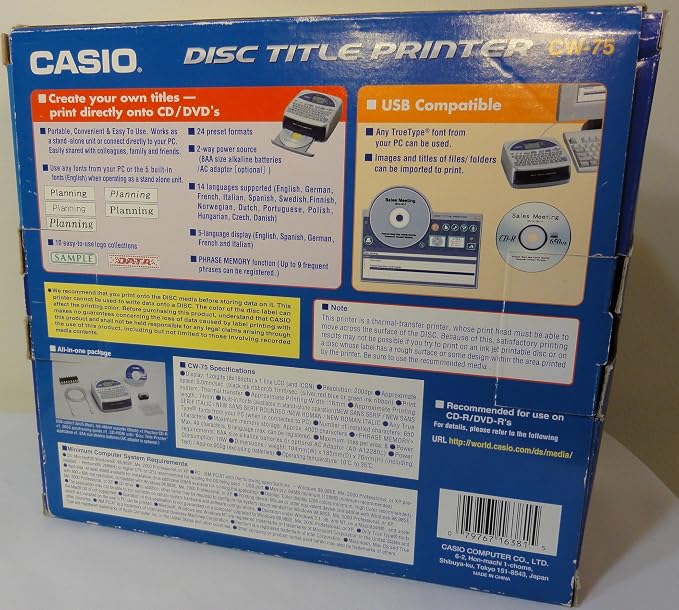
Print directly on CDs and DVDs without applying labels using the CW-75 Disc Title Printer. The machine produces crisp, clear, professional results, and allows for up to 16 lines of text. The printer is powered by batteries or AC adaptor and supports importing graphics, text, and files.

Fast
Shipping

Free
Return*

Secure Packaging

100% Original Products

PCI DSS Compliance

ISO 27001 Certified


Note: Step Down Voltage Transformer required for using electronics products of AS store (110-120). Recommended power converters Beli Sekarang.


What Stands Out
QWERTY Keyboard
The CW-75 features a user-friendly QWERTY keyboard for easy typing, enhancing productivity and convenience for label creation without complicated layouts.
Versatile Printing
Designed specifically for disc titles, this printer produces high-quality labels that are perfect for organizing and personalizing CDs, DVDs, and Blu-rays, addressing the need for clear identification.
Compact Design
Its compact and portable design allows for easy storage and transportation, making it an ideal choice for both home and professional settings needing efficient labeling solutions.
Rincian Produk
- Thermal printing for CD and DVD labeling without using labels
- Prints directly on CDs and DVDs with 18 alpha-numeric and 4 graphic formats
- Ability to import graphics, text, and files for printing
- Produces professional-looking CD-Rs/DVDs with various color options
- Prints up to 16 lines on a typical CD-R with a print area measuring 5/8 x 2 15/16
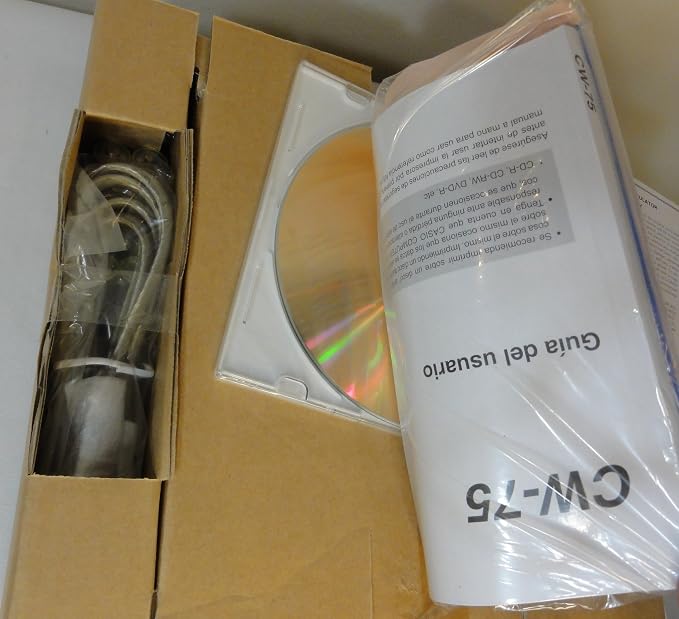
- Powered by eight AA size batteries or an optional AC adaptor, and comes with USB cable, software, black ink ribbon, template, and sample CD-R
| Printer Type | Thermal |
| Other Special Features of the Product | CD printing |
| Printer Output Type | Color |
| Item Weight | 2 Pounds (910 grams) |
| Print media | Labels |
| Maximum Copy Speed Black and White | 1 ppm |
| Compatible Devices | Smartphones |
| Ink Color | Cyan, Magenta, Yellow, Black |
| Additional Printer Functions | Print Only |
| Control Method | Touch |
| Processor Count | 1 |
| Number of Drivers | 1 |
| Resolution | 200 x 200 |
| Color Pages per Minute | 1 ppm |
| B&W Pages per Minute | 1 ppm |
| Maximum Media Size | 120 mm |
| Maximum Sheet Capacity | 1 |
| Paper Size | 5.625 inches (14.3 cm) |
| Output sheet capacity | 1 |
| Printer Connectivity Type | USB |
| Hardware Interface | USB |
| Total USB 2.0 Ports | 1 |
| Total Usb Ports | 1 |
| Brand | Casio |
| Model Name | CW-75 |
| Model Number | CW-75 |
| Built-In Media | USB Cable |
| Series Number | 75 |
| Model Series | CW-75 |
| Specific Uses For Product | Document Printing |
| UPC | 079767163815 |
| Global Trade Identification Number | 00079767163815 |
| Manufacturer | Casio Inc. |
| Unit Count | 1.0 Count |
| Color | Silver and blue |
| Color Depth | 1 bpp |
| Maximum print Resolution Color | 200 dpi |
| Maximum Print Resolution Black and White | 200 dpi |
| Dual-sided printing | Yes |
| Duplex | Automatic |
| Maximum Copy Resolution Color | 600x600 dpi |
| Maximum Copy Resolution Black and White | 200 dpi |
| Connectivity Technology | USB |
| Printing Technology | Thermal |
| Special Feature | CD printing |
| Printer Output | Color |
| Maximum Print Speed (Color) | 1 ppm |
| Max Printspeed Monochrome | 1 ppm |
What's in the box
USB Cable
Who Should Buy?

-
Home Users
Ideal for organizing personal media collections with customized labels for CDs and DVDs, enhancing home entertainment experiences.
-
Small Businesses
Great for small offices needing to label products, DVDs, or promotional materials efficiently to maintain professional branding.
-
Students
Perfect for students creating multimedia projects, allowing them to label their work in an organized and visually appealing manner.

-
Large Enterprises
Not suited for large companies needing high-volume printing or advanced labeling solutions beyond what CW-75 offers.
-
Professional Printers
Professional print shops may find this printer's quality and speed inadequate for commercial labeling demands.
-
Tech-Savvy Users
Those seeking advanced features like wireless connectivity or high-resolution prints may find the CW-75 lacking.
DESKRIPSI PRODUK
Punya Pertanyaan? Berbincanglah dengan kami
Tanya & Jawab Pelanggan
-
pertanyaan:
What is the primary function of the Casio Disc Title Printer CW-75?
menjawab: The Casio Disc Title Printer CW-75 is designed to create custom labels for CDs, DVDs, and Blu-ray discs. With its integrated QWERTY keyboard, users can easily type and design labels that suit their preferences. This product is especially useful for musicians, filmmakers, or anyone who regularly creates and distributes disc media. The ability to personalize each label not only enhances organization but also adds a professional touch to your collections. -
pertanyaan:
Can I print in color with the Casio CW-75?
menjawab: No, the Casio CW-75 primarily supports black and white printing. However, it allows for the creation of intricate designs with various fonts and symbols, using the available monochrome printing capabilities. Users can create visually appealing labels by employing different lettering styles and layouts. This is particularly beneficial for artists or content creators looking to maintain a cohesive brand image while labeling their media. -
pertanyaan:
Is the Casio Disc Title Printer compatible with various disc sizes?
menjawab: Yes, the Casio Disc Title Printer CW-75 accommodates standard disc sizes, including CDs, DVDs, and Blu-ray discs. It’s equipped with templates that help align your designs correctly for each type of disc, ensuring a perfect fit. Whether you're labeling albums, movies, or data storage, this printer provides versatility and convenience, making it ideal for both personal and professional use. -
pertanyaan:
What type of labels can I use with the Casio CW-75?
menjawab: The CW-75 works with Casio’s specially designed disc labels that are compatible with its printing system. These labels come in various formats that suit different types of discs. By using the right labels, you will achieve the best print quality and durability, ensuring that your labels will look sharp and resist wear over time. This is crucial for preserving the presentation of your media collection. -
pertanyaan:
How do I set up the Casio Disc Title Printer CW-75?
menjawab: Setting up the CW-75 involves connecting it to a power source, inserting the appropriate disc labels, and powering on the device. It features a straightforward interface that guides you through choosing design options and layouts. Beginners can quickly learn to navigate its user-friendly controls, making it accessible for everyone. This helps streamline your labeling process, whether for personal projects or business needs. -
pertanyaan:
Can I save my label designs on the Casio CW-75?
menjawab: Yes, the Casio Disc Title Printer CW-75 allows users to save custom label templates for future use. This feature enables quick access to recurring designs, which is particularly valuable for businesses or individuals who frequently label similar discs. By saving layouts, users can maintain consistency across different media without having to recreate designs from scratch every time. -
pertanyaan:
Does the CW-75 support multiple fonts and styles?
menjawab: Absolutely! The Casio CW-75 comes with a variety of fonts, styles, and design elements to choose from. Users can mix and match these options to create unique and attractive labels that stand out. This is especially useful for those aiming to build a brand identity or ensure that their media collections are not only organized but also visually appealing. -
pertanyaan:
What is the printing speed of the Casio CW-75?
menjawab: The printing speed of the Casio Disc Title Printer CW-75 is relatively quick, allowing users to produce labels efficiently. While specific speeds can vary based on design complexity, most users find the printing process to be rapid enough for both small and larger label batches. This efficiency makes the CW-75 suitable for users who require timely results, whether for personal crafting or commercial labeling tasks. -
pertanyaan:
What materials are the labels made from for the CW-75?
menjawab: Casio Disc Title Printer labels are crafted from durable materials designed to withstand handling and storage conditions. These labels ensure that your printed designs remain intact over time, resisting wear, scratches, and fading. This durability is particularly beneficial for media collections that need to be frequently accessed or shared, maintaining both quality and accessibility. -
pertanyaan:
Where can I buy Casio Disc Title Printer with Qwerty keyboard CW-75?
menjawab: You can purchase the Casio Disc Title Printer with Qwerty keyboard CW-75 from Ubuy in Indonesia. Ubuy offers a reliable platform to buy this product along with all necessary accessories, ensuring a smooth shopping experience for customers.
Casio Label Makers CW-75 Editorial Review
The Casio Disc Title Printer with QWERTY keyboard (CW-75) is a reliable and easy-to-use printer that allows you to print text on your discs. It prints as fast as you can type, taking about 30 seconds or less per print. The printer can handle both glossy and matte surfaces, although it works best with mirror finish CDs. The ink dries quickly upon opening the tray, so there's no need to wait. With the ability to print multiple lines of text, this printer offers versatility and is a good investment for anyone looking to label their discs.
Customer Reviews & Ratings
44 peringkat pelanggan
-
5 bintang
50%
-
4 bintang
7%
-
3 bintang
15%
-
2 bintang
5%
-
1 bintang
23%
Ulas produk ini
Bagikan pikiran Anda kepada pelanggan lain
Pro
- Fast printing speed
- Works with both glossy and matte surfaces
- Ability to print multiple lines of text
Kontra
- Does not work with inkjet CDs
Platform Trust & Buyer Confidence

MT
Mohd
Verified buyer
“The product received very good packaging & safe…Thank You”
16 June 2026 · via Trustpilot
SJ
Shawati
Verified buyer
“Accurate delivery timing given”
16 June 2026 · via Trustpilot
YB
Youcef
Verified buyer
“Not madly expensive like I thought, and much quicker than promised.”
15 June 2026 · via Trustpilot
LM
Leila
Verified buyer
“Never dealt with Ubuy before, but everything worked out great. Seamless cross border purchasing and shipping. Thanks!”
6/7/2026 · via Trustpilot
KA
Kwame
Verified buyer
“The process was smooth, with clear communication and timelines. This was my 1st purchase and I am really impressed. I will definitely be coming back.”
12 June 2026 · via Trustpilot
Pembayaran Aman
Global Delivery
Easy Returns
Genuine Products
Product Price History
Informasi penting
- Batasan : Untuk produk yang dikirim secara internasional, harap diperhatikan bahwa garansi pabrik mungkin tidak berlaku; pilihan layanan pabrikan mungkin tidak tersedia; manual produk, instruksi, dan peringatan keselamatan mungkin tidak tersedia dalam bahasa negara tujuan; produk (dan material penyerta) mungkin tidak dirancang sesuai standar, spesifikasi, dan persyaratan pelabelan negara tujuan; dan produk mungkin tidak sesuai dengan voltase negara tujuan dan standar kelistrikan lainnya (memerlukan penggunaan adaptor atau konverter jika tersedia). Penerima bertanggung jawab untuk memastikan bahwa produk tersebut dapat diimpor secara sah ke negara tujuan. Saat memesan dari Ubuy atau afiliasinya, penerima tercatat sebagai importir dan harus mematuhi semua hukum dan peraturan negara tujuan.
- Tidak semua produk yang terdaftar di Ubuy sedang dijual, karena Ubuy adalah mesin pencari global. Produk tunduk pada peraturan ekspor/perdagangan.
IDR 5061340
Pesan sekarang dan dapatkan kira-kira pada Selasa, Juli 28
This item is not restrict in my country.(Please click on above link if this item is not restrict in your country, So our team will review and allow.)
QTY:
Secured transaction
PCI DSS compliant and ISO 27001:2022 certified, with encrypted payments and full buyer protection on every order.
Our Top Logistics Partners
Fastest cross-border delivery
Fitur & Manfaat
- Print directly on CDs and DVDs without labels
- Produces professional results with up to 16 lines of text
- Powered by batteries or AC adaptor
- Supports importing graphics, text, and files
Ubuy Assurance
Experience worry-free shopping with 100% original products, PCI DSS-compliant payment security, ISO 27001-certified data protection, the fastest cross-border delivery, free returns *, and secure packaging on every order.