0 ratings






Barang #:
85906771
Makeblock Bundle of mBot Robot Kit with Scratch Coding Box + Wireless Bluetooth Remote Controller
89% of respondents would recommend this to a friend
Barang #:
85906771
IDR 2959789
Price Details
Excluding Shipping & Custom charges ( Shipping and custom charges will be calculated on checkout )
*All items will import from AS
14%
0 ratings
Tulis ulasan
Persediaan
 Diimpor dari toko USA
Secured transaction
Ubuy works hard to protect your security and privacy. Our advanced payment security system ensures confidentiality by encrypting your information during transmission using AES (Advanced Encryption Standards) and SSL (Secure Socket Layer) protocols. Your payment details are 100% secure as we do not share your payment details with third party sellers.
Our Top Logistics Partners


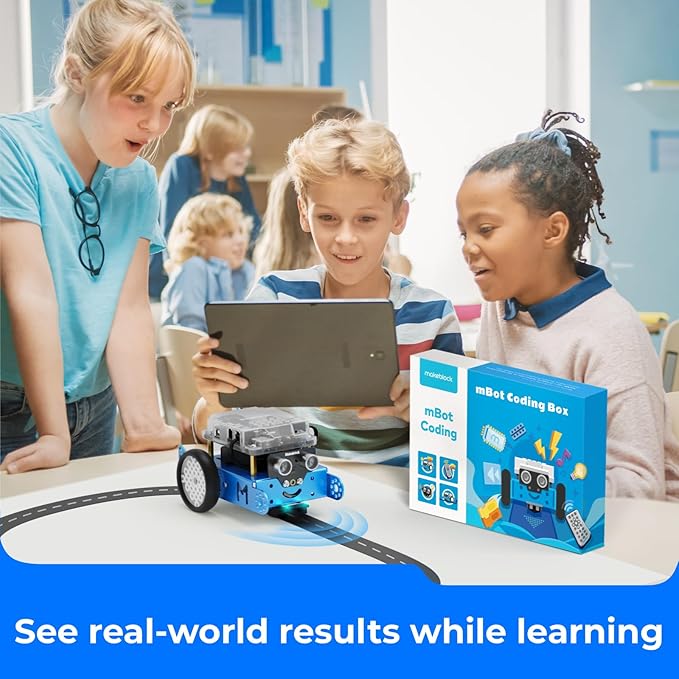
Kids can learn code step by step with the mBlock blockly App.
Bundel ini berisi 2 item


Fast
Shipping

Free
Return*

Secure Packaging

100% Original Products

PCI DSS Compliance

ISO 27001 Certified









Note: Step Down Voltage Transformer required for using electronics products of AS store (110-120). Recommended power converters Beli Sekarang.


What Stands Out
Interactive Learning
Engages kids with hands-on robotics and coding through Scratch, fostering creativity and critical thinking skills.
Wireless Control
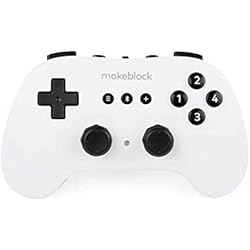
Includes a wireless Bluetooth remote controller, allowing seamless operation without tangled wires, enhancing ease of use.
Comprehensive Kit
Offers a complete set for building and programming, ensuring a rich educational experience in STEM fields for young learners.
Rincian Produk
| Brand Name | Makeblock |
| Age Range Description | Kid |
| Educational Objective | Coding Skills, STEM |
| Set Name | mBot Robot Kit with Scratch Coding Box + Wireless Bluetooth Remote Controller |
| Unit Count | 3 Count |
| Manufacturer | Makeblock |
| Manufacturer Part Number | P1050025 & P3060003 |
| Manufacturer recommended age | 0 - 12 years |
| Theme | Robotics |
| Battery Description | Lithium-Ion |
| Material Type | Plastic, Lithium-Ion |
| Size | Small |
| Item Weight | 2.2 lbs (1 kg) |
Who Should Buy?

-
Young Learners
Ideal for children aged 8 and above to develop programming skills through engaging, hands-on experience with robotics.
-
Educators
Great for teachers looking to introduce STEM concepts in classrooms, fostering creativity through interactive coding lessons.
-
Hobbyists
Perfect for robotics enthusiasts who enjoy building and programming their custom robots using Scratch coding platform.

-
Advanced Users
May not suffice for experienced programmers or engineers seeking more advanced robotics and coding capabilities.
DESKRIPSI PRODUK
Punya Pertanyaan? Berbincanglah dengan kami
Pertanyaan & Jawaban Pelanggan
-
pertanyaan:
What is the Makeblock mBot Robot Kit used for?
menjawab: The Makeblock mBot Robot Kit is designed for educational purposes, allowing users to learn coding and robotics. It combines hardware and software to provide a hands-on experience in programming through Scratch, a user-friendly visual programming language. This kit is perfect for beginners, young learners, and educators who wish to foster STEM skills and creativity in a fun way, making it ideal for classrooms, coding camps, or home use. -
pertanyaan:
How can I program the mBot using Scratch?
menjawab: Programming the mBot is straightforward with the Scratch-based software provided. After connecting the mBot via Bluetooth, users can drag and drop coding blocks to create various commands and functions, facilitating an engaging learning experience. This coding method enhances understanding of logic and problem-solving while enabling users to create exciting projects, like automated obstacle avoidance or sound-activated actions. -
pertanyaan:
What features does the mBot Robot Kit include?
menjawab: The mBot Robot Kit comes with an array of features such as a wireless Bluetooth remote controller, various sensors (like ultrasonic and light sensors), LED lights, and a programmable motherboard. These components enable users to build versatile robotic applications, enhancing creativity and technical skills. Users can develop projects ranging from simple movements to more complex tasks requiring sensor integration, broadening their understanding of robotics. -
pertanyaan:
Is the mBot suitable for young children?
menjawab: Yes, the mBot is designed with users aged 8 and up in mind. It features easy assembly and a simplified coding interface, making it accessible for beginners. As children engage with the kit, they develop critical thinking and coding skills while having fun. Scenarios like setting up a small obstacle course or enabling the mBot to follow a line can provide an engaging environment for learning and discovery. -
pertanyaan:
What resources are available for learning with the mBot?
menjawab: Users can access a variety of resources, including detailed assembly instructions, programming tutorials, and project ideas from Makeblock’s official website. Community forums and instructional videos offer additional support and inspiration. These resources empower users to maximize their learning experience, whether working on individual projects at home or collaborating in educational settings. -
pertanyaan:
Can the mBot be upgraded or expanded?
menjawab: Absolutely! The mBot Robot Kit is compatible with additional Makeblock modules and accessories. Users can expand the functionality of their mBot by integrating more advanced sensors, motors, or attachments to create innovative projects. This flexibility is perfect for users looking to continuously challenge themselves and learn more about robotics and coding as they gain experience. -
pertanyaan:
How long does it take to assemble the mBot?
menjawab: Assembly time for the mBot typically ranges from 30 to 60 minutes, depending on experience level. The kit comes with clear instructions and all necessary components. Beginners may take longer, but this time also serves as a learning experience, as users familiarize themselves with parts and basic robotics concepts. Once assembled, users find it easy to dive into programming their creation. -
pertanyaan:
What platforms can I use to program the mBot?
menjawab: The primary platform for programming the mBot is the Makeblock Scratch software, which is web-based and suited for children. Additionally, users can explore Makeblock’s mBlock software, available on Windows and macOS, which offers similar block-based coding along with advanced programming via Arduino for more experienced coders. This versatility accommodates different learning stages and technical skills. -
pertanyaan:
Are there any compatibility issues with mobile devices?
menjawab: The mBot connects to mobile devices via Bluetooth, supporting both iOS and Android platforms. Makeblock provides a dedicated mBlock app for coding on the go. Users should ensure their device is Bluetooth-enabled and compatible with the latest versions of the app. This capability fosters an interactive learning experience, allowing users to program and control their mBot from smartphones or tablets. -
pertanyaan:
Where can I buy the Makeblock mBot Robot Kit in Indonesia?
menjawab: You can purchase the Makeblock mBot Robot Kit with Scratch Coding Box and Wireless Bluetooth Remote Controller through Ubuy in Indonesia. Ubuy offers a wide selection of educational kits and resources, ensuring you have access to the latest products. It's a great platform to explore not only the mBot but a variety of other innovative educational tools and gadgets.
Makeblock Science Kits & Toys Editorial Review
Ulasan editorial tidak ditemukan
Customer Reviews & Ratings
1 peringkat pelanggan
-
5 bintang
100%
-
4 bintang
0%
-
3 bintang
0%
-
2 bintang
0%
-
1 bintang
0%
Ulas produk ini
Bagikan pikiran Anda kepada pelanggan lain
Pro
- User-friendly interface
- Enhanced creativity
- Robust build quality
- Wireless connectivity
- Customizable programming
Kontra
- Limited battery life
Platform Trust & Buyer Confidence

JK
Jasmin
Verified buyer
“Great products and very good service: very easy and very fast international delivery.”
9 September 2026 · via Trustpilot
AG
Anke
Verified buyer
“Wonderful online shopping experience, smooth transaction from the start. Payment method works conveniently and delivery is unexpectedly fast and reliable. You go the extra mile for service. What makes this even more amazing, you deliver to Namibia. I will remain a happy Ubuy customer and will increase my purchases for sure! Thank you!”
10 September 2026 · via Trustpilot
H
Hazel
Verified buyer
“Very easy to find the products what you need, and so fast delivery, that’s why I highly recommended to others costumers to used ubuy.”
10 September 2026 · via Trustpilot
O
Opaleye
Verified buyer
“I received exactly what I ordered I was skeptical about your site because that was my first time to order. But the order came timely and neatly packaged. I was not disappointed. Thank you.”
11 September 2026 · via Trustpilot
AC
Adele
Verified buyer
“Easy to find and order what you want on the website. Delivery is quick to the UK”
8 September 2026 · via Trustpilot
Pembayaran Aman
Global Delivery
Easy Returns
Genuine Products
Product Price History
Informasi penting
- Batasan : Untuk produk yang dikirim secara internasional, harap diperhatikan bahwa garansi pabrik mungkin tidak berlaku; pilihan layanan pabrikan mungkin tidak tersedia; manual produk, instruksi, dan peringatan keselamatan mungkin tidak tersedia dalam bahasa negara tujuan; produk (dan material penyerta) mungkin tidak dirancang sesuai standar, spesifikasi, dan persyaratan pelabelan negara tujuan; dan produk mungkin tidak sesuai dengan voltase negara tujuan dan standar kelistrikan lainnya (memerlukan penggunaan adaptor atau konverter jika tersedia). Penerima bertanggung jawab untuk memastikan bahwa produk tersebut dapat diimpor secara sah ke negara tujuan. Saat memesan dari Ubuy atau afiliasinya, penerima tercatat sebagai importir dan harus mematuhi semua hukum dan peraturan negara tujuan.
- Tidak semua produk yang terdaftar di Ubuy sedang dijual, karena Ubuy adalah mesin pencari global. Produk tunduk pada peraturan ekspor/perdagangan.
IDR 2959789
Pesan sekarang dan dapatkan kira-kira pada Monday, September 28
This item is not restrict in my country.(Please click on above link if this item is not restrict in your country, So our team will review and allow.)
QTY:
Secured transaction
PCI DSS compliant and ISO 27001:2022 certified, with encrypted payments and full buyer protection on every order.
Our Top Logistics Partners
Fastest cross-border delivery
Fitur & Manfaat
- Wireless controller for remote control and learning
- Designed to teach kids robot programming
- Coding software platform for beginners
- Efficient and accurate handle for pairing with robot
- Great for fun group play and racing
- Provides a screen-free, realistic play experience
Ubuy Assurance
Experience worry-free shopping with 100% original products, PCI DSS-compliant payment security, ISO 27001-certified data protection, the fastest cross-border delivery, free returns *, and secure packaging on every order.